Manage
Subscription & Plans
Understand CDNZero's plans, AI credits, and how to upgrade.
app.cdnzero.com
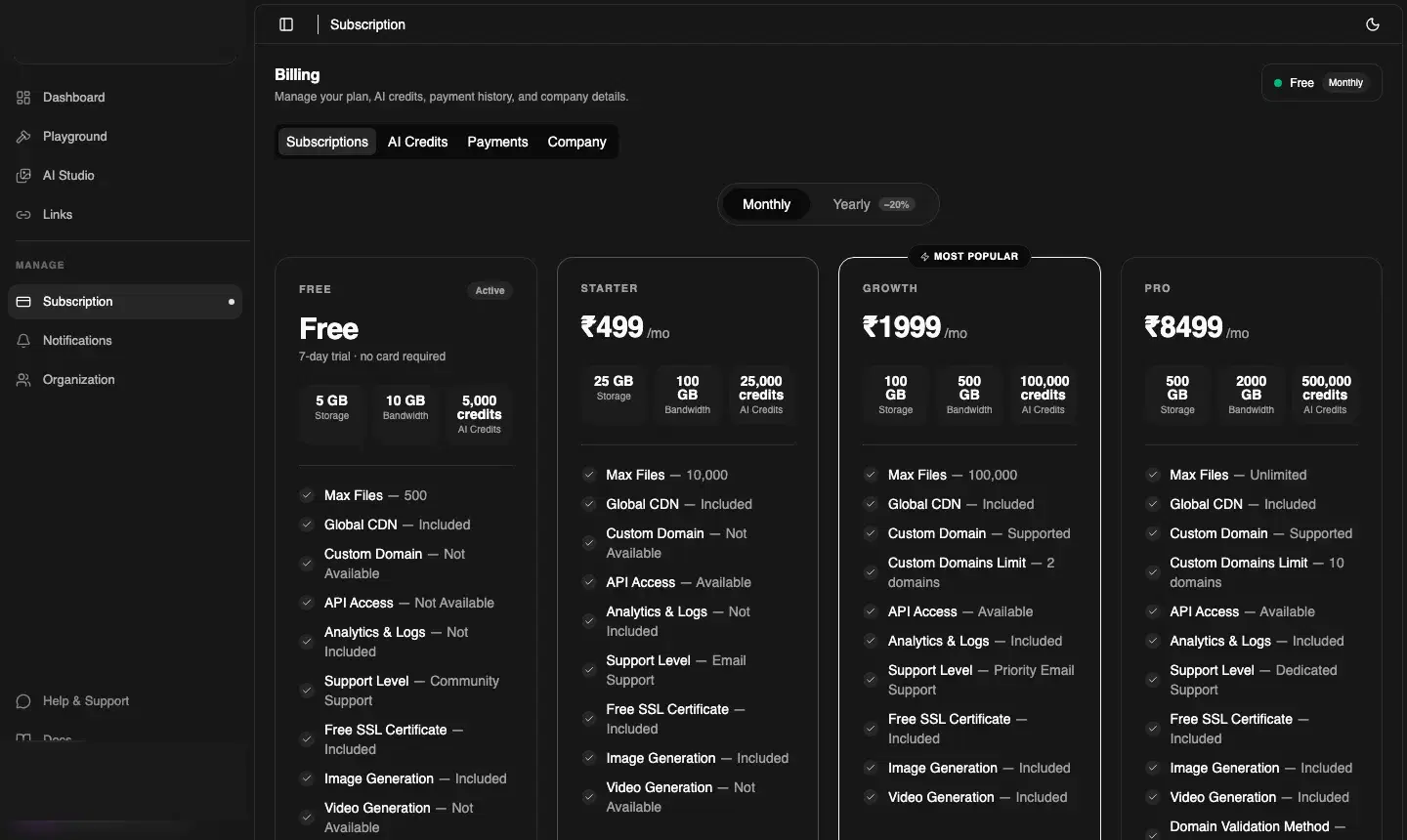
Plans at a glance
Free
₹07-day trial
- ✓ 5 GB storage
- ✓ 5,000 AI credits/mo
- ✗ Video generation
Starter
₹499/mo
- ✓ 25 GB storage
- ✓ 25,000 AI credits/mo
- ✗ Video generation
Most Popular
Growth
₹1999/mo
- ✓ 100 GB storage
- ✓ 100,000 AI credits/mo
- ✓ Video generation
Pro
₹8499/mo
- ✓ 500 GB storage
- ✓ 500,000 AI credits/mo
- ✓ Video generation
Full feature comparison
| Feature | Free | Starter | Growth | Pro |
|---|---|---|---|---|
| Storage | 5 GB | 25 GB | 100 GB | 500 GB |
| AI credits/mo | 5,000 | 25,000 | 100,000 | 500,000 |
| Max files | 500 | 10,000 | 50,000 | Unlimited |
| Global CDN | ✓ | ✓ | ✓ | ✓ |
| Custom domain | ✗ | ✗ | Supported | Supported |
| AI image generation | ✓ | ✓ | ✓ | ✓ |
| AI video generation | ✗ | ✗ | ✓ (Beta) | ✓ |
| Analytics & Logs | Basic | Standard | Advanced | Full |
| API Access | ✓ | ✓ | ✓ | ✓ |
| Priority support | ✗ | ✗ | ✓ | ✓ Priority Email |
| Free SSL certificate | ✓ | ✓ | ✓ | ✓ |
Monthly vs Yearly billing
The Subscription page has a Monthly / Yearly toggle at the top. Choosing Yearly billing gives a significant discount — approximately 2 months free.
Upgrading your plan
- Go to Manage → Subscription
- Click the plan card you want to upgrade to
- Complete payment via the Razorpay checkout (cards, UPI, net banking)
- Your new limits apply immediately
ℹ️ Plan expiry
If your plan expires and you haven't renewed, a banner will block navigation to non-billing pages until you upgrade or renew. Your files and links are preserved — only new uploads and AI generation are paused.
Topping up AI Credits
You can add more AI credits any time without changing your base plan. From the Dashboard home, click Top up next to the AI Credits card and purchase additional credit packs.
Payments tab
Click the Payments tab on the Subscription page to see your full billing history. Download a PDF invoice for any payment by clicking the download icon on that row.